TCFD repord failed
- Post By Jure Zilic
- 11 months ago
- Post Type Public
Hi,
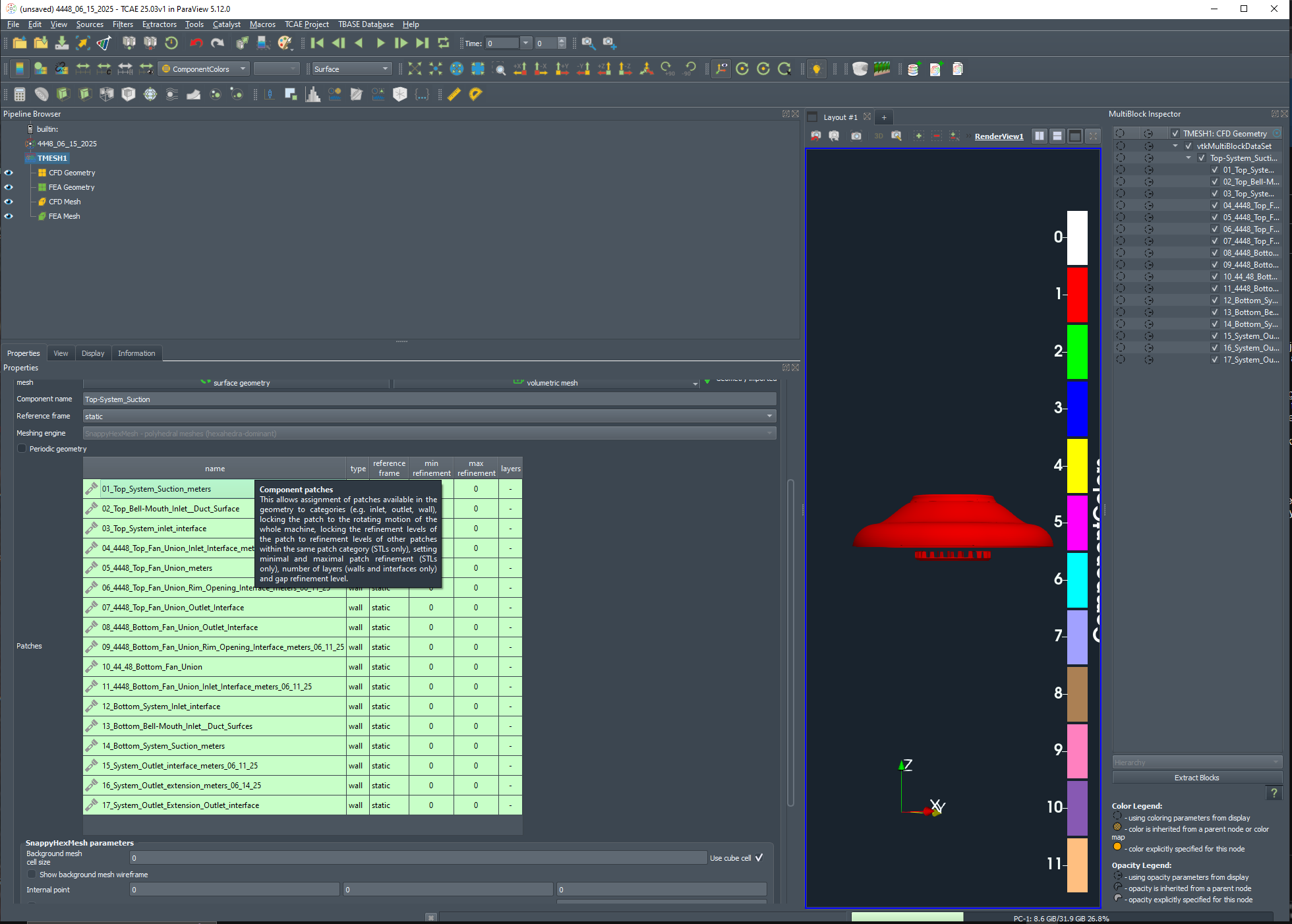
I have a problem with report at the end?
Program made all 3000 iteration ( about 1.200.000 pcs), but at the end is allways problem with the report: (see picture below).
Thanks.
Hi,
I have a problem with report at the end?
Program made all 3000 iteration ( about 1.200.000 pcs), but at the end is allways problem with the report: (see picture below).
Thanks.
Hi,
I have a problem with report at the end?
Program made all 3000 iteration ( about 1.200.000 pcs), but at the end is allways problem with the report: (see picture below).
Thanks.
SLOT GACOR 4D merupakan situs slot gacor ang memberikan berbagai pilihan penyedia slot 4D paling top hari ini. serta membrikan kemenangan gacor setiap hari. Penyedia pilihan dari berbagai negara dapat di akses dengan sangat mudah mulai dari Pg Soft, Pragmatic Play, Habanero, Microgaming, Nolimit City, Hacksaw Gamingyang memiliki RTP tinggi seindonesia. Segera dapatkan pengalaman gacornya untuk scatter hitam dari berbagai penyedia slot terpercaya yang selal membayar kemenangan mu.
Hi! I'm a beginner CFD user, and I've encountered a strange bug with my mesh. When I reduce the firstLayerThickness to a smaller value, the mesh stops working. The layer doesn't generate properly, and I get an error saying my refineBox isn't inside my blockMesh, which is incorrect.
TCAE-Lite is designed for those with limited budgets.
Over 50 man-years of consistent development on top of open-source condensed in unlimited software at the cost of a daily cup of coffee.
https://www.cfdsupport.com/tcae-lite.html
hashtag#CFD hashtag#Simulation hashtag#FluidDynamics hashtag#FlowVisualization
I am looking to simulate the power output of an in pipe axial turbine, I don't have any experience in CFD simulations and I've decided to brake down the project into 3 parts, first I am going to simulate just the pipe in which the turbine is going to be housed, then a static state with the turbine in the pipe, and finally setup the rotation of the turbine.
I've made a quick 3D model of the pipe and I tried copying the setup from the pipe example, I ran into a problem where the mesher consumes all the available RAM on the computer and locks it up, I assume the STL mesh has a hole somewhere but I couldn't find it, I've had issues before with glitches in STL meshes made in Rhinoceros 3D, the modeling program I used, so I decided to recreate the pipe example with the STLs from the example, and that meshed successfully, but I got an error in the TCFD part "TCFD calculation failed. Please consult the chapter 'Rescue list' in the TCAE Manual for possible reasons of the failure.", I couldn't find the Rescue list chapter in the manual online.
Also the TCAE Output gives this error:
"Application decomposePar failed.
For detailed information check error log at: "C:\Users\Name\Desktop\CFD Test\CFD_test\simulationRun1\TCFD\logRun\solve-err-decomposePar-stationary-1.log"".
And in that log file is:
"--> FOAM FATAL IO ERROR:
Cannot find patchField entry for Co1_pipe-wall_wall
file: C:/Users/Name/Desktop/CFD Test/CFD_test/simulationRun1/TCFD/stationary/0/nut/boundaryField from line 32 to line 54.
From function void Foam::GeometricField<Type, PatchField, GeoMesh>::Boundary::readField(const Foam::DimensionedField<TypeR, GeoMesh>&, const Foam::dictionary&) [with Type = double; PatchField = Foam::fvPatchField; GeoMesh = Foam::volMesh]
in file /opt/OpenFOAM-dev/src/OpenFOAM/lnInclude/GeometricBoundaryField.C at line 184.
FOAM exiting"
Attached is a rough diagram of how will the setup work.
I don't have an idea what to try next, and would be thankful for any assistance.
CANTIKTOTO adalah situs Togel terpercaya yang ada di Indonesia dari beberapa situs biasa lainnya, CANTIKTOTO adalah situs yang memiliki pasaran togel terlengkap dan sehingga sudah banyak memiliki member aktif yang bermain di situs togel ini.
CANTIKTOTO menghadirkan beberapa pengalamab dalam bertaruh paling lancar dan sangat menyenangkan, dengan proses penarikan uang nya yang cepat dan aman CANTIKTOTO menjamin kenyamanan dan kepuasan pemain. CANTIKTOTO bukan hanya sekedar pengedar situs togel online, tetapi juga tempat atau rumah yang nyaman bagi para permainan judi favorit lainnya seperti Slot Online, Poker, Live Casino.
Dengan melakukan deposit minimal hanya dengan 20,000 rupiah, Anda akan mendapatkan kesempatan untuk menikmati beragam permainan seru hanya dengan satu user ID pengguna! Bukan hanya itu saja, CANTIKTOTO di dukung oleh situs bandar judi togel terbesar di Asia. Jadi tidak usah di ragukan lagi untuk bermain di situs judi togel CANTIKTOTO untuk memastikan pengalaman bermain anda tak hanya menyenangkan tetapi juga bisa menguntungkan anda.
Bergabunglah dengan kami sekarang juga! Proses pendaftaran di Situs CANTIKTOTO sangatlah mudah dan tidak memakan waktu yang sangat banyak, anda bisa mendaftarkan akun anda melalui smartphone anda. Jangan lewatkan kesempatan dengan kemudahan akses situs CANTIKTOTO kapan saja dan di mana saja anda mau, jadi tunggu apa lagi? Ayo daftarkan diri anda untuk bermain di situs CANTIKTOTO!
Situs CANTIKTOTO Memiliki 5 Pasaran Togel dan Dengan Hadiah Terbesarnya
Dengan sejauh ini apakah Anda siap untuk menjalani petualangan situs judi togel ini? Anda tidak hanya menebak angka dengan prediksi yang cermat tapi juga merasakan keseruan dalam bermaindi pasar toge yang paling populer. Kami menawarkan akses ekslusif 4 ( empat ) pasaran togel yang paling di minati, dan banyak di operasikan oleh bandar-bandar togel lainnya. Berikut beberapa pasaran populer yang bisa Anda temukan di CANTIKTOTO:
- Togel Singapore
Pasaran Togel Singapore adalah pasaran yang terpopuler di dunia perjudian togel, dan sangat terkenal oleh semua orang yang bermain judi togel yang membuat akan terkenal pasaran ini ialah kepopulerannya dan kepercayaannya. Hampir semua situs judi togel online di Indonesia menghadirkan Togel singapore, sebuah pilihan yang sudah terpercaya akan kemenarikannya bagi pemain dan bandar.
- Togel Hongkong
Pasaran Togel Hongkong adalah pasaran togel resmi yang berasal dari pusat Hong Kong. Pasaran Hong Kong dan Pasaran Singapore adalah pasaran yang bekerja sama sebagai salah satu pasar terbesar di Indonesia.
- Togel Sydney Lotto
Pasaran Togel Sydney adalah pasaran yang kini masuk kedalam kategori bandar togel resmi. Dengan penghargaan yang resmi, mereka menawarkan hadiah yang menarik, membuat pasaran Sydney lotto ini menjadi pilihan terpercay.
- Togel Toto Macau
Pasaran Togel Toto Macau adalah pasaran yang terlama dan tertua sejak tahun 2010, Toto Macau telah banyak menarik penggemar para penjudi Togel, dengan 6 ( enam ) kali pengeluaran setiap hari nya dan siaran langsung nya yang bisa di akses kapan saja, pasaran ini menawarkan pengalaman yang terbaik unik dan menarik untuk semua para penjudi Togel di Indonesia.
CANTIKTOTO Dengan Mensupport System Selama 24 Jam Non Stop
Di CANTIKTOTO memiliki tim pelayanan yang terbaik dan tercepat yang pernah ada. Dengan Tim pelayanan kami yang tercepat dan teramah kami selalu siap membantu apa masalah anda dalam setiap permainan yang anda alami saat bermain di permainan kami dan itu lah kami berkomitmen untuk memberikan pengalaman terbaik kami yang tak kalah dengan situs-situs lainnya. Hubungi kami kapan saja, dan rasakan pelayanan yang benar-benar peduli dan responsif terhadap permasalahan dan kebutuhan anda.
Cara Mendaftar Akun di CANTIKTOTO
Dengan mendaftar akun di CANTIKTOTO adalah hal yang sangat gampang dan tidak menghabiskan waktu yang banyak, di situs in kemenangan yang anda cari-cari dari dulu ada dan peluang nya sangat besar tidak usah di ragukan lagi dengan apa yang ada di situs slot gampang menang ini. Berikut beberapa tahapan dasar memulai pendaftaran akun bersama CANTIKTOTO sebagai berikut:
1. Kunjungi Website resmi platform resmi slot gacor gampang menang
2. Klik pada pencarian yang teratas
3. Isi secara tepat beberapa data seperti :
4. Pilih menu pada halaman utama bertulisan "DAFTAR" disamping menu "MASUK"
5. Jika form pendaftaran sudah muncul silahkan di isi data-datanya seperti:
- Nama Lengkap
- Nomor Handphone
- Username
- Password
- Konfirmasi Password
- Nama Bank
- Nama Rekening
- Nomor Rekening
- Kode Referral (jika ada)
- Kode Validasi
Hi Foamers,
Based on the given instructions underneath, I have been able to come up with this design. Could you help confirm if the attached image to this topic looks promising or requires some modifications? Thanks π
βIntroduction
Finishing a small meshing task is the first possibility multi-block mesh using the blockMesh utility or Salome,
e. The task, creation of a small
|
What |
|
|
All (4) mesh blocks |
|
|
All (4) mesh blocks and arcs |
|
|
All (4) mesh blocks, arcs, and patches |
|
|
All (4) graded mesh blocks, arcs, and patches |
|
Geometry
wall
outlet
cut
inlet
Z
Parameters d=50.8 mm
I=508 mm a=12.7 mm
= a/2
Description
The geometry represents half of the 2" pipe inner volume. It is composed of four building blocks. The first block (No. 1) represents the core of the pipe. The other blocks (No. 2, 3, and 4) fill the outside pipe volume.
The mesh blocks must be split by more than one cell in every direction. You can select how many cells you want to use. Apply the mesh grading, if possible.
The outside volume surfaces are called inlet, outlet, wall, and cut. Select an appropriate patch type for each surface.
The blockMesh utility writes out a log. Ensure no errors are reported.
Hint: The local coordinate system in each block should be aligned with the global coordinate system!β
I would like to report an issues with SnappyHexMesh when running with OpenFoam v2306. I'm currently try to run SnappyHexMesh with high mesh number structure in HPC cloud environment. Unfortunately, the process of "snappyhexmesh -overwrite" stuck and hanging at refinement phase with message "Found point (-0.001 0.0015 0.0015) in cell 40402 on processor 0". I did run this on serial processing method with VM specification 44vCPU and 315GiB of memory. I already try to run over parallels processing but it's same. Below are sequences of steps I did run and produce the message. Mesh number are define by "blockMeshDict". From my observation, this happens when I'm running with higher mesh number but if I'm lowering the number the process works fine.
Running steps:
foamCleanPolyMesh
blockMesh
topoSet
createPatch -overwrite
surfaceFeatureExtract
# Run snappyHexMesh before decomposition
snappyHexMesh -overwrite << this steps produce the hanging process.
Hey everyone,
Iβm working on a harmonic analysis simulation and have a question about splitting the frequency range.
Letβs say the frequency range Iβm analyzing is from 10 Hz to 100 Hz. Instead of running the harmonic simulation for the entire range in one go, is it feasible to split the range into smaller intervals, for example:
One simulation for 10-50 Hz, and
Another for 50-100 Hz?
Iβm trying to understand if this approach would still provide accurate results or if there are any drawbacks, particularly at the boundaries where the ranges are split. Has anyone used this method in their analysis, and if so, were there any issues with accuracy or continuity?
From my understanding, harmonic analysis calculates the steady-state response at a specific frequency. For example, consider the system at 10 Hz, assuming no damping. We know the equation is:
M(xβ²β²)+k(x)=Fsinβ‘(Οt)M(x'') + k(x) = F \sin(\omega t)M(xβ²β²)+k(x)=Fsin(Οt)
Since 10 Hz is the starting frequency, the initial displacement at all nodes would be zero, x(t)=0x(t) = 0x(t)=0. By solving this, we get the response for this frequency.
Now, when the solver moves to 11 Hz, will it assume the initial displacement is zero again, or will it consider the solution from the previous frequency?
Iβd appreciate any insights or suggestions regarding the feasibility of splitting the frequency range and how solvers handle initial conditions between different frequencies.
This is more like an open question than a fully formed topic with both question and answer.
I am running an incompressible laminar flow simulation with the pimpleFoam solver. It has two openings on one side (n1 and n2) and one on the other (n3). I have set up the pressure boundary conditions so that the flow is driven primarily by the pressure applied at n3. The flow should be changing direction halfway. Realistically, the total volume passing through an opening should be the same for the two flow direction. Yet, when I sum over the patch flow rates (postProcessing function) of the two flow directions and compare them, they are different. What could be the potential reason(s) for this phenomenon?
Following is the pressure boundary condition I set up:
/*--------------------------------*- C++ -*----------------------------------*\
========= |
\\ / F ield | OpenFOAM: The Open Source CFD Toolbox
\\ / O peration | Website: https://openfoam.org
\\ / A nd | Version: 10
\\/ M anipulation |
\*---------------------------------------------------------------------------*/
FoamFile
{
version 2.0;
format ascii;
class volScalarField;
object p;
}
// * * * * * * * * * * * * * * * * * * * * * * * * * * * * * * * * * * * * * //
dimensions [0 2 -2 0 0 0 0];
internalField uniform 0;
boundaryField
{
n1
{
type totalPressure;
p0 uniform 0; // Reference total pressure (e.g., atmospheric pressure in Pascals)
U U; // Velocity field name
phi phi; // Flux field name
rho none; // Density, use 'none' for incompressible flow
psi none; // Compressibility, use 'none' for incompressible flow
gamma 1; // For incompressible flow, use 1
}
n2
{
type totalPressure;
p0 uniform 0; // Reference total pressure
U U;
phi phi;
rho none;
psi none;
gamma 1;
}
n3
{
type uniformTotalPressure;
p0
{
type sine;
frequency 0.3333333333333333;
amplitude -50.0;
level 0;
}
}
walls
{
type zeroGradient;
}
defaultFaces
{
type empty;
}
}
// ************************************************************************* //ο»Ώ
CFDSUPPORT has initiated a benchmark that tests and compares the speed of various processors, providing crucial insights for engineering simulations.
ππ₯οΈ Not just that, we're inviting academicians, professionals, and enthusiasts like YOU to contribute! Yes, ALL participants are welcome! π
Your contribution will help us better understand the performance of different CPUs and their role in streamlining engineering simulations. This is a unique opportunity to be a part of a global research initiative, right from the comfort of your home or office. ππ’
For a comprehensive understanding, do check out our full case study π (download option available) at https://www.cfdsupport.com/motorbike-cpu-processor-benchmark.html
Help us create a more informed academic and professional community. Let's benchmark for a better tomorrow! πͺπ
#OpenFOAM #CFDBenchmark #CPUSpeedTest #EngineeringSimulations #GlobalResearchInitiative πππ¬π₯οΈπ
Hi there
I don't know if tihs would help but I was wondering if anyone can help me to apply a "opening" condition in OpenFoam, in the picture you can see almost a square, and what I have in my problem is that from a little part of the left side I have an inlet and a part of the top part I have an outlet. Also I know that my outlet takes twice the flow that goes in from the inlet, and in the right side its like a room, we have more space, so what I wanted to do is to stablish an opening boundary to make my system have air outside of that, I'm currently using a pressure of 0 and the velocity I don't know what to set, I have set "zeroGradient' "opening" "fixedGradient" "calculatedValue" and nothing work, my simulation always diverges.
I hope someone could help me,
thanks in advance
Lorem Ipsum is simply dummy text of the printing and typesetting industry. Lorem Ipsum has been the industry's standard dummy text ever since the 1500s, when an unknown printer took a galley of type and scrambled it to make a type specimen book. It has survived not only five centuries, but also the leap into electronic typesetting, remaining essentially unchanged. It was popularised in the 1960s with the release of Letraset sheets containing Lorem Ipsum passages, and more recently with desktop publishing software like Aldus PageMaker including versions of Lorem Ipsum.